<?xml version="1.0" encoding="utf-8"?><feed xmlns="http://www.w3.org/2005/Atom" ><generator uri="https://jekyllrb.com/" version="4.3.3">Jekyll</generator><link href="https://vagos.github.io//feed/blog.xml" rel="self" type="application/atom+xml" /><link href="https://vagos.github.io//" rel="alternate" type="text/html" /><updated>2026-02-20T05:01:34+00:00</updated><id>https://vagos.github.io//feed/blog.xml</id><title type="html">Vagos Lamprou | Blog</title><subtitle>Evangelos (Vagos) Lamprou</subtitle><entry><title type="html">Send yourself command output via email</title><link href="https://vagos.github.io//blog/email-cmd-output.html" rel="alternate" type="text/html" title="Send yourself command output via email" /><published>2025-12-27T00:00:00+00:00</published><updated>2025-12-27T00:00:00+00:00</updated><id>https://vagos.github.io//blog/email-cmd-output</id><content type="html" xml:base="https://vagos.github.io//blog/email-cmd-output.html"><![CDATA[<p>You can email yourself (or anyone else) the output of any command with <a href="http://www.mutt.org/"><code class="language-plaintext highlighter-rouge">mutt</code></a> using the following one-liner:</p>

<div class="language-bash highlighter-rouge"><div class="highlight"><pre class="highlight"><code>cmd | mutt <span class="nt">-s</span> <span class="s2">"</span><span class="nv">$subject</span><span class="s2">"</span> <span class="s2">"</span><span class="nv">$email</span><span class="s2">"</span>
</code></pre></div></div>

<p>Noting something across devices (almost all of them are connected to my email).</p>
<div class="language-bash highlighter-rouge"><div class="highlight"><pre class="highlight"><code><span class="nb">echo</span> <span class="s2">"</span><span class="nv">$x</span><span class="s2"> </span><span class="nv">$y</span><span class="s2"> </span><span class="nv">$z</span><span class="s2">"</span> | mutt <span class="nt">-s</span> <span class="s2">"Reminder"</span> <span class="s2">"</span><span class="nv">$email</span><span class="s2">"</span>
</code></pre></div></div>

<p>Sending a morning reminder of active <a href="https://taskwarrior.org/">tasks</a> (running as a <code class="language-plaintext highlighter-rouge">cron</code> job).</p>
<div class="language-bash highlighter-rouge"><div class="highlight"><pre class="highlight"><code>task active | mutt <span class="nt">-s</span> <span class="s2">"Tasks"</span> <span class="s2">"</span><span class="nv">$email</span><span class="s2">"</span>
</code></pre></div></div>]]></content><author><name></name></author><category term="shell" /><category term="mail" /><category term="mutt" /><summary type="html"><![CDATA[A one-liner to email command output to yourself using mutt.]]></summary></entry><entry><title type="html">Foundation Models and Unix</title><link href="https://vagos.github.io//blog/foundation-models-unix.html" rel="alternate" type="text/html" title="Foundation Models and Unix" /><published>2025-03-29T00:00:00+00:00</published><updated>2025-03-29T00:00:00+00:00</updated><id>https://vagos.github.io//blog/foundation-models-unix</id><content type="html" xml:base="https://vagos.github.io//blog/foundation-models-unix.html"><![CDATA[<p>Here are some examples of how foundation models can be used in a UNIX-like
environment. A model is considered foundational when it has been trained on a
large and diverse dataset, enabling it to be used out-of-the-box or fine-tuned
for a wide range of downstream tasks.</p>

<p>In most of these examples, classic and modern UNIX utilities are used to stitch
together different tools. A foundation model is then applied to tackle problems
that go beyond well-defined solutions. Finally, UNIX utilities are used again
to constrain, refine, or reshape the model’s output, transforming it into
something useful.</p>

<p><img src="/assets/img/llm-unix/util-and-model.jpg" alt="Util and Model" /></p>

<h2 id="creating-playlists">Creating playlists</h2>
<p>Consider a scenario where you have downloaded
a number of songs and want to organize them into playlists. Manually
selecting tracks so that they smoothly transition from one to the other
can be time-consuming and requires intimacy with one’s music collection.
However, by using a model that understands music and sound to translate
each song into a point in space, and then interpolating between these
points, it is possible to automatically create coherent playlists. This
recipe takes advantage of the <code class="language-plaintext highlighter-rouge">llm</code><sup id="fnref:1" role="doc-noteref"><a href="#fn:1" class="footnote" rel="footnote">1</a></sup> utility and some
accompanying plugins,<sup id="fnref:2" role="doc-noteref"><a href="#fn:2" class="footnote" rel="footnote">2</a></sup> but the technique can be implemented using
analogous tools.</p>

<p><img src="/assets/img/llm-unix/interpolate.jpg" alt="wrapped image" class="wrap-right" width="150px" />
A model that understands audio can be used to embed our music
collection (<code class="language-plaintext highlighter-rouge">$MC</code>) into a high-dimensional space, where similar songs are
placed closer together. With the <code class="language-plaintext highlighter-rouge">llm-clap</code> plugin, we can generate
embeddings for our collection using the CLAP model with
<code class="language-plaintext highlighter-rouge">llm embed-multi -m clap songs --files $MC '*'</code> Now, each one of
our songs and its corresponding embedding are saved in a local
<code class="language-plaintext highlighter-rouge">embeddings.db</code> database, which we can query. Then, the
<code class="language-plaintext highlighter-rouge">llm-interpolate</code> plugin returns interpolated points between a starting
and ending point (song), creating between them a path (playlist). For
example, this one-liner generates a 5-song <code class="language-plaintext highlighter-rouge">.m3u</code> playlist between
<code class="language-plaintext highlighter-rouge">PacifyHer.wav</code> and <code class="language-plaintext highlighter-rouge">redrum.wav</code>:</p>

<div class="language-bash highlighter-rouge"><div class="highlight"><pre class="highlight"><code>llm interpolate songs <span class="s2">"PacifyHer"</span> <span class="s2">"redrum"</span> <span class="nt">-n</span> 5 | jq .[] <span class="o">&gt;</span> playlist.m3u
</code></pre></div></div>

<h2 id="taking-notes">Taking notes</h2>
<p>It can be tricky to take notes while watching videos of talks.
A model that can generate summaries of the video content can be used to
generate notes, which can be reviewed and expanded upon later. This can
also help rapidly expand one’s set of notes. The following two-liner
uses the <code class="language-plaintext highlighter-rouge">llm</code> utility to generate a summary of a video
transcript downloaded using <code class="language-plaintext highlighter-rouge">yt-dlp</code> and finally pipes the output
to create a new note object using <code class="language-plaintext highlighter-rouge">zk</code>.<sup id="fnref:3" role="doc-noteref"><a href="#fn:3" class="footnote" rel="footnote">3</a></sup></p>

<div class="language-bash highlighter-rouge"><div class="highlight"><pre class="highlight"><code>yt-dlp <span class="nt">--no-download</span> <span class="nt">--write-subs</span> <span class="nt">--output</span> <span class="s2">"</span><span class="nv">$OUT</span><span class="s2">"</span> <span class="s2">"</span><span class="nv">$URL</span><span class="s2">"</span>
<span class="nb">cat</span> <span class="s2">"</span><span class="nv">$OUT</span><span class="s2">"</span> | llm <span class="nt">-s</span> <span class="s2">"Create notes"</span> | zk new <span class="nt">-i</span>
</code></pre></div></div>

<h2 id="generating-reports">Generating reports</h2>
<p>It is common practice for people working
together to have monthly, weekly, or even daily meetings where all
members give a short update on what they have been working on. These
reports can be frustrating as they demand the right level of
abstraction—neither too detailed for team members lacking context nor
too broad to allow meaningful feedback. Forgetting the specifics of your
recent work adds to the challenge.</p>

<p>Digital todo-list tools like <code class="language-plaintext highlighter-rouge">taskwarrior</code><sup id="fnref:4" role="doc-noteref"><a href="#fn:4" class="footnote" rel="footnote">4</a></sup> can be leveraged
to generate these reports by smartly querying them and piping their
output into an LLM. The following pipeline (1) queries taskwarrior for
all of last week’s completed tasks, (2) exports them in json format, (3)
uses <code class="language-plaintext highlighter-rouge">jq</code><sup id="fnref:5" role="doc-noteref"><a href="#fn:5" class="footnote" rel="footnote">5</a></sup> to extract the <code class="language-plaintext highlighter-rouge">.description</code> attribute from
each one, and (4) provides the completed task list to an LLM asking it
to generate the report.</p>

<div class="language-bash highlighter-rouge"><div class="highlight"><pre class="highlight"><code>task status:completed end.after:today-7d <span class="nb">export</span> |
jq <span class="s1">'.[] | .description'</span> |
llm <span class="nt">-s</span> <span class="s1">'Generate a report based on these tasks.'</span>
</code></pre></div></div>

<h2 id="renaming-pictures">Renaming pictures</h2>
<p>Consider the scenario where you have a large
collection of pictures saved. If these pictures are taken by you, or
downloaded from the internet, chances are the image files have vague or
useless names.</p>

<div class="language-bash highlighter-rouge"><div class="highlight"><pre class="highlight"><code><span class="nv">$ </span><span class="nb">ls 
</span>1672714705640839.png 1689964585834142.png 2.jpg
</code></pre></div></div>

<p>The laborious process of renaming each one can be automated by
leveraging a model with image-understanding capabilities. For this
recipe, one can use <code class="language-plaintext highlighter-rouge">ollama</code>,<sup id="fnref:6" role="doc-noteref"><a href="#fn:6" class="footnote" rel="footnote">6</a></sup> a very usable LLM model
fetching and inference tool that works great out-of-box with the
<code class="language-plaintext highlighter-rouge">moondream</code> vision model, which is small enough to allow for
quick inference on a modern laptop. The following pipeline finds every
<code class="language-plaintext highlighter-rouge">.jpg</code> file in the current directory and asks the model to
provide a title for it based on the image contents, some light
formatting at the end makes whatever the model outputs into a plausible
filename.</p>

<div class="language-bash highlighter-rouge"><div class="highlight"><pre class="highlight"><code>find <span class="nb">.</span> <span class="nt">-name</span> <span class="s2">"*.jpg"</span> | 
xargs <span class="nt">-I</span><span class="o">{}</span> ollama run moondream <span class="s2">"Title for this: {}"</span> |
<span class="nb">tr</span> <span class="s1">' '</span> <span class="s1">'_'</span> | <span class="nb">sed</span> <span class="s1">'s/$/\.jpg/'</span>
</code></pre></div></div>

<p>The (slightly truncated) output filenames are (zoom-in to confirm):
<code class="language-plaintext highlighter-rouge">A_green_dragon_with_wings_and_a_tail.jpg</code> <img src="/assets/img/llm-unix/a.jpg" alt="image" width="20px" />,
<code class="language-plaintext highlighter-rouge">A_painting_of_a_serene_landscape.jpg</code> <img src="/assets/img/llm-unix/b.jpg" alt="image" width="20px" />,
<code class="language-plaintext highlighter-rouge">urns_of_stone_red_car_in_foreground.jpg</code> <img src="/assets/img/llm-unix/c.jpg" alt="image" width="20px" />.</p>

<h1 id="conclusion">Conclusion</h1>

<p>This article serves as a starting inspiration point for the community to
start using these technologies for fun and profit. Please reach out with
thoughts and ideas.</p>

<p><strong><em>This article is part of Paged Out! magazine, issue #6. You can get a free PDF of the magazine on the <a href="https://pagedout.institute">Paged Out! website</a>.</em></strong></p>

<hr />

<div class="footnotes" role="doc-endnotes">
  <ol>
    <li id="fn:1" role="doc-endnote">
      <p><a href="https://github.com/simonw/llm">https://github.com/simonw/llm</a> <a href="#fnref:1" class="reversefootnote" role="doc-backlink">&#8617;</a></p>
    </li>
    <li id="fn:2" role="doc-endnote">
      <p><a href="https://github.com/vagos/llm-clap"><code class="language-plaintext highlighter-rouge">llm-clap</code></a>, <a href="https://github.com/vagos/llm-interpolate"><code class="language-plaintext highlighter-rouge">llm-interpolate</code></a> <a href="#fnref:2" class="reversefootnote" role="doc-backlink">&#8617;</a></p>
    </li>
    <li id="fn:3" role="doc-endnote">
      <p><a href="https://github.com/zk-org/zk">https://github.com/zk-org/zk</a> <a href="#fnref:3" class="reversefootnote" role="doc-backlink">&#8617;</a></p>
    </li>
    <li id="fn:4" role="doc-endnote">
      <p><a href="https://taskwarrior.org">https://taskwarrior.org</a> <a href="#fnref:4" class="reversefootnote" role="doc-backlink">&#8617;</a></p>
    </li>
    <li id="fn:5" role="doc-endnote">
      <p><a href="https://jqlang.github.io/jq">https://jqlang.github.io/jq</a> <a href="#fnref:5" class="reversefootnote" role="doc-backlink">&#8617;</a></p>
    </li>
    <li id="fn:6" role="doc-endnote">
      <p><a href="https://ollama.com">https://ollama.com</a> <a href="#fnref:6" class="reversefootnote" role="doc-backlink">&#8617;</a></p>
    </li>
  </ol>
</div>]]></content><author><name></name></author><category term="shell" /><category term="llm" /><category term="jq" /><category term="taskwarrior" /><summary type="html"><![CDATA[Using foundation models in Unix pipelines]]></summary></entry><entry><title type="html">Add GitHub Issues to Taskwarrior</title><link href="https://vagos.github.io//blog/gh2task.html" rel="alternate" type="text/html" title="Add GitHub Issues to Taskwarrior" /><published>2025-02-18T00:00:00+00:00</published><updated>2025-02-18T00:00:00+00:00</updated><id>https://vagos.github.io//blog/gh2task</id><content type="html" xml:base="https://vagos.github.io//blog/gh2task.html"><![CDATA[<p>You can convert GitHub issues into <a href="https://taskwarrior.org/">Taskwarrior</a>
tasks using <a href="https://cli.github.com/"><code class="language-plaintext highlighter-rouge">gh</code></a> and <a href="https://jqlang.org/"><code class="language-plaintext highlighter-rouge">jq</code></a>.</p>

<p>The <code class="language-plaintext highlighter-rouge">gh</code> CLI allows you to list all issues in a repository as JSON. This can include
attributes like <code class="language-plaintext highlighter-rouge">title</code>, <code class="language-plaintext highlighter-rouge">url</code>, and <code class="language-plaintext highlighter-rouge">labels</code>. You can then use <code class="language-plaintext highlighter-rouge">jq</code> to
transform this output into a line based format, extract whatever attributes
you need, and finally add them as tasks with <code class="language-plaintext highlighter-rouge">task add</code>.</p>

<p>The <code class="language-plaintext highlighter-rouge">gh issue ls --json title,url</code> outputs something like this:</p>

<div class="language-json highlighter-rouge"><div class="highlight"><pre class="highlight"><code><span class="p">[</span><span class="w">
  </span><span class="p">{</span><span class="w">
    </span><span class="nl">"title"</span><span class="p">:</span><span class="w"> </span><span class="s2">"An Issue"</span><span class="p">,</span><span class="w">
    </span><span class="nl">"url"</span><span class="p">:</span><span class="w"> </span><span class="s2">"https://github.com/user/repo/issues/1"</span><span class="w">
  </span><span class="p">},</span><span class="w">
  </span><span class="p">{</span><span class="w">
    </span><span class="nl">"title"</span><span class="p">:</span><span class="w"> </span><span class="s2">"Another Issue"</span><span class="p">,</span><span class="w">
    </span><span class="nl">"url"</span><span class="p">:</span><span class="w"> </span><span class="s2">"https://github.com/user/repo/issues/2"</span><span class="w">
    </span><span class="p">}</span><span class="w">
</span><span class="p">]</span><span class="w">
</span></code></pre></div></div>

<p>Then, <code class="language-plaintext highlighter-rouge">jq -c '.[]'</code> will flatten the array and output an issue per line:</p>

<div class="language-json highlighter-rouge"><div class="highlight"><pre class="highlight"><code><span class="p">{</span><span class="nl">"title"</span><span class="p">:</span><span class="s2">"An Issue"</span><span class="p">,</span><span class="w">     </span><span class="nl">"url"</span><span class="p">:</span><span class="s2">"https://github.com/user/repo/issues/1"</span><span class="p">}</span><span class="w">
</span><span class="p">{</span><span class="nl">"title"</span><span class="p">:</span><span class="s2">"Another Issue"</span><span class="p">,</span><span class="nl">"url"</span><span class="p">:</span><span class="s2">"https://github.com/user/repo/issues/2"</span><span class="p">}</span><span class="w">
</span></code></pre></div></div>

<p>The final script looks like this:</p>

<div class="language-bash highlighter-rouge"><div class="highlight"><pre class="highlight"><code><span class="k">while </span><span class="nb">read</span> <span class="nt">-r</span> issue<span class="p">;</span> <span class="k">do
  </span><span class="nv">title</span><span class="o">=</span><span class="si">$(</span>jq <span class="nt">-r</span> <span class="s1">'.title'</span> <span class="o">&lt;&lt;&lt;</span> <span class="s2">"</span><span class="nv">$issue</span><span class="s2">"</span><span class="si">)</span>
  <span class="nv">url</span><span class="o">=</span><span class="si">$(</span>jq <span class="nt">-r</span> <span class="s1">'.url'</span> <span class="o">&lt;&lt;&lt;</span> <span class="s2">"</span><span class="nv">$issue</span><span class="s2">"</span><span class="si">)</span>
  task add <span class="s2">"</span><span class="nv">$title</span><span class="s2">"</span> url:<span class="s2">"</span><span class="nv">$url</span><span class="s2">"</span>
<span class="k">done</span> &lt; &lt;<span class="o">(</span>gh issue <span class="nb">ls</span> <span class="nt">--json</span> title,url | jq <span class="nt">-c</span> <span class="s1">'.[]'</span><span class="o">)</span>
</code></pre></div></div>

<p>Here, I’ve added <code class="language-plaintext highlighter-rouge">url</code> as a <a href="https://taskwarrior.org/docs/udas/">user-defined-attribute (UDA)</a>.
I can then inspect a task with <code class="language-plaintext highlighter-rouge">task info &lt;task-id&gt;</code> to see the URL.</p>

<p>Example output (truncated):</p>

<div class="language-bash highlighter-rouge"><div class="highlight"><pre class="highlight"><code><span class="nv">$ </span>task
ID Age   Description 
 1 1min  An Issue
 2 1min  Another Issue

<span class="nv">$ </span>task info 1
Name          Value
ID            1
Description   An Issue
Status        Pending
URL           https://github.com/user/repo/issues/1
</code></pre></div></div>

<p>You can also turn issue labels into task tags by adding <code class="language-plaintext highlighter-rouge">labels</code> to the <code class="language-plaintext highlighter-rouge">gh issue</code> invocation, like <code class="language-plaintext highlighter-rouge">gh issue ls --json title,url,labels</code>.</p>]]></content><author><name></name></author><category term="taskwarrior" /><category term="github" /><category term="jq" /><category term="shell" /><summary type="html"><![CDATA[A script to turn GitHub issues into Taskwarrior tasks]]></summary></entry><entry><title type="html">Convert time and date to local time</title><link href="https://vagos.github.io//blog/date-convert.html" rel="alternate" type="text/html" title="Convert time and date to local time" /><published>2023-07-02T00:00:00+00:00</published><updated>2023-07-02T00:00:00+00:00</updated><id>https://vagos.github.io//blog/date-convert</id><content type="html" xml:base="https://vagos.github.io//blog/date-convert.html"><![CDATA[<p>When you get an email that sets a meeting for “12PM noon EDT”, you can quickly 
get that in your local timezone using the <code class="language-plaintext highlighter-rouge">date</code> command from GNU <code class="language-plaintext highlighter-rouge">coreutils</code>.</p>

<div class="language-bash highlighter-rouge"><div class="highlight"><pre class="highlight"><code><span class="nv">$ </span><span class="nb">date</span> <span class="nt">--date</span><span class="o">=</span><span class="s2">"12 PM EDT"</span>
Sat Jul  1 07:00:00 PM EEST 2023
</code></pre></div></div>]]></content><author><name></name></author><summary type="html"><![CDATA[Convert time and date to local time using the date command]]></summary></entry><entry><title type="html">What I Use</title><link href="https://vagos.github.io//blog/what-i-use.html" rel="alternate" type="text/html" title="What I Use" /><published>2023-04-19T00:00:00+00:00</published><updated>2023-04-19T00:00:00+00:00</updated><id>https://vagos.github.io//blog/what-i-use</id><content type="html" xml:base="https://vagos.github.io//blog/what-i-use.html"><![CDATA[<p>This is a collection of software that I use on a daily basis. I try to keep it updated.</p>

<table>
  <thead>
    <tr>
      <th><strong>Category</strong></th>
      <th><strong>Setup</strong></th>
    </tr>
  </thead>
  <tbody>
    <tr>
      <td>operating system</td>
      <td>arch linux (everywhere except my macbook)</td>
    </tr>
    <tr>
      <td>music listening</td>
      <td><a href="https://github.com/ncmpcpp/ncmpcpp">ncmpcpp</a> with <a href="https://docs.mopidy.com/en/latest/installation/">mopidy</a> + plugins (youtube, spotify, etc.)</td>
    </tr>
    <tr>
      <td>text editor</td>
      <td><a href="https://neovim.io/">neovim</a></td>
    </tr>
    <tr>
      <td>browser</td>
      <td><a href="https://www.qutebrowser.org/index.html">qutebrowser</a>, fallback: <a href="https://brave.com/">brave</a></td>
    </tr>
    <tr>
      <td>document writing</td>
      <td><a href="https://en.wikipedia.org/wiki/latex">latex</a>, or markdown + <a href="https://pandoc.org/">pandoc</a></td>
    </tr>
    <tr>
      <td>music production</td>
      <td><a href="https://www.bitwig.com/">bitwig studio</a> (formerly <a href="https://www.image-line.com/">fl studio</a>), also tried <a href="http://ardour.org/">ardour</a></td>
    </tr>
    <tr>
      <td>image editing</td>
      <td><a href="https://www.gimp.org/">gimp</a></td>
    </tr>
    <tr>
      <td>font</td>
      <td><a href="https://github.com/slavfox/cozette">cozette</a></td>
    </tr>
    <tr>
      <td>terminal emulator</td>
      <td><a href="https://github.com/alacritty/alacritty">alacritty</a></td>
    </tr>
    <tr>
      <td>window manager</td>
      <td><a href="https://i3wm.org/">i3</a></td>
    </tr>
    <tr>
      <td>note taking</td>
      <td><a href="https://github.com/zk-org/zk">zk</a></td>
    </tr>
    <tr>
      <td>task managing</td>
      <td><a href="https://taskwarrior.org/">taskwarrior</a></td>
    </tr>
    <tr>
      <td>git hosting</td>
      <td><a href="https://git.zx2c4.com/cgit/">cgit</a> hosted on home server</td>
    </tr>
    <tr>
      <td>password manager</td>
      <td><a href="https://www.passwordstore.org/">pass</a>, synced via cgit</td>
    </tr>
    <tr>
      <td>mail</td>
      <td><a href="https://aerc-mail.org/">aerc</a></td>
    </tr>
  </tbody>
</table>]]></content><author><name></name></author><category term="personal" /><category term="software" /><summary type="html"><![CDATA[Software I use]]></summary></entry><entry><title type="html">Making an MCI Command Parser for ScummVM</title><link href="https://vagos.github.io//blog/mci.html" rel="alternate" type="text/html" title="Making an MCI Command Parser for ScummVM" /><published>2023-04-11T00:00:00+00:00</published><updated>2023-04-11T00:00:00+00:00</updated><id>https://vagos.github.io//blog/mci</id><content type="html" xml:base="https://vagos.github.io//blog/mci.html"><![CDATA[<p>A few weeks ago I did some work with the people over at the <a href="https://www.scummvm.org/">ScummVM</a> codebase, 
a large engine reimplementation project.
Their community<sup id="fnref:1" role="doc-noteref"><a href="#fn:1" class="footnote" rel="footnote">1</a></sup> is really welcoming and great for anyone (even beginners) interested in
working in open source.</p>

<h1 id="the-mci-protocol">The MCI Protocol</h1>

<p>I wrote a parser for the MCI protocol, an old Windows media API.
I was given quite a bit of documentation regarding MCI, and the fact that this protocol 
even existed was very interesting.</p>

<p>MCI stands for “Media Control Interface” and is a high-level API for
controlling media devices. It is now mostly unused in favor of more modern
protocols like DirectShow (part of DirectX) and Universal Windows Platform. The
idea is that device drivers would implement API and would thus be controllable through
high-level commands like <code class="language-plaintext highlighter-rouge">play file.wav from 0 to 100</code>.</p>

<p>The general command structure is:</p>

<div class="language-bash highlighter-rouge"><div class="highlight"><pre class="highlight"><code><span class="nb">command</span> &lt;device&gt; <span class="o">[</span>parameters ...]
</code></pre></div></div>

<p>It’s actually quite a nice and simple way of controlling your devices.</p>

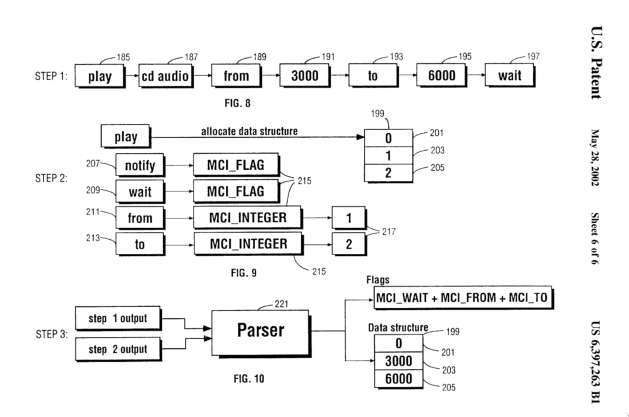
<p>IBM filed a <a href="https://patents.google.com/patent/US6397263">patent</a> in 2002 for
the mechanism which parses MCI commands. The entire document was quite
intriguing, since they are explaining quite a simple program that takes a
command string and turns it into a data structure<sup id="fnref:2" role="doc-noteref"><a href="#fn:2" class="footnote" rel="footnote">2</a></sup> (basically just a parser).
They even describe the tokenization procedure and that
tokens will be saved in a linked list (as opposed to an array), probably to
fascilitate for low memory devices. 
I wonder if someone implementing the MCI protocol would have to pay IBM for it.</p>

<p><img src="/assets/img/mci/patent.png" alt="MCI Patent (parsing part)" /></p>

<h1 id="the-command-table">The Command Table</h1>

<p>An interesting part of their implementation is how there is no
specific command list/specification. Rather, a command table 
will have to be provided which is parsed and each command’s arguments
are determined from it.
This way, someone can add new commands to the protocol by just modifying this table.
In our code, we keep the table as a structure in-memory.
Here is part of the table that corresponds to MCI’s <code class="language-plaintext highlighter-rouge">open</code> commmand:</p>

<div class="language-cpp highlighter-rouge"><div class="highlight"><pre class="highlight"><code><span class="k">static</span> <span class="n">CmdTableRow</span> <span class="n">table</span><span class="p">[]</span> <span class="o">=</span> <span class="p">{</span>
  <span class="p">{</span><span class="s">"open"</span>            <span class="p">,</span><span class="n">MCI_OPEN</span>      <span class="p">,</span><span class="mi">0</span>          <span class="p">,</span><span class="n">MCI_COMMAND_HEAD</span> <span class="p">},</span>
  <span class="p">{</span><span class="s">""</span>                <span class="p">,</span><span class="n">MCI_INTEGER</span>   <span class="p">,</span><span class="mi">0</span>          <span class="p">,</span><span class="n">MCI_RETURN</span> <span class="p">}</span>      <span class="p">,</span>
  <span class="p">{</span><span class="s">"notify"</span>          <span class="p">,</span><span class="mh">0x00000001L</span>   <span class="p">,</span><span class="o">-</span><span class="mi">1</span>         <span class="p">,</span><span class="n">MCI_FLAG</span> <span class="p">}</span>        <span class="p">,</span>
  <span class="p">{</span><span class="s">"wait"</span>            <span class="p">,</span><span class="mh">0x00000002L</span>   <span class="p">,</span><span class="o">-</span><span class="mi">1</span>         <span class="p">,</span><span class="n">MCI_FLAG</span> <span class="p">}</span>        <span class="p">,</span>
  <span class="p">{</span><span class="s">"type"</span>            <span class="p">,</span><span class="mh">0x00002000L</span>   <span class="p">,</span><span class="o">-</span><span class="mi">1</span>         <span class="p">,</span><span class="n">MCI_STRING</span> <span class="p">}</span>      <span class="p">,</span>
  <span class="p">{</span><span class="s">"element"</span>         <span class="p">,</span><span class="mh">0x00000200L</span>   <span class="p">,</span><span class="o">-</span><span class="mi">1</span>         <span class="p">,</span><span class="n">MCI_STRING</span> <span class="p">}</span>      <span class="p">,</span>
  <span class="p">{</span><span class="s">"alias"</span>           <span class="p">,</span><span class="mh">0x00000400L</span>   <span class="p">,</span><span class="o">-</span><span class="mi">1</span>         <span class="p">,</span><span class="n">MCI_STRING</span> <span class="p">}</span>      <span class="p">,</span>
  <span class="p">{</span><span class="s">"shareable"</span>       <span class="p">,</span><span class="mh">0x00000100L</span>   <span class="p">,</span><span class="o">-</span><span class="mi">1</span>         <span class="p">,</span><span class="n">MCI_FLAG</span> <span class="p">}</span>        <span class="p">,</span>
  <span class="p">{</span><span class="s">""</span>                <span class="p">,</span><span class="mh">0x00000000L</span>   <span class="p">,</span><span class="o">-</span><span class="mi">1</span>         <span class="p">,</span><span class="n">MCI_END_COMMAND</span> <span class="p">}</span> <span class="p">,</span>
  <span class="c1">// ...</span>
</code></pre></div></div>

<p>For my implementation, I studied how Wine <a href="https://github.com/wine-mirror/wine/blob/9e99c6f66d236101a084b6a3a24c98b5c8677fe5/dlls/winmm/mci.c">implemented an MCI parser</a>.
Their code is a little esoteric, thanks to variable names like <code class="language-plaintext highlighter-rouge">dwParam2</code> and
<code class="language-plaintext highlighter-rouge">S_MciCmdTable[uTbl].lpTable</code>. It’s not entirely the Wine project’s fault
though, as they are following <a href="https://learn.microsoft.com/en-us/windows/win32/stg/coding-style-conventions">old windows coding style conventions</a>.</p>

<p>Studying Wine’s code gave me some insight into what “compatibility layer” means.
If a program had code which executed MCI commands using the <a href="https://learn.microsoft.com/en-us/windows/win32/multimedia/sending-a-command">Win32 API</a>, Wine goes through and actually parses 
them at a high level, “translating” them into calls to Linux sound/video APIs.</p>

<p>This is exactly what we did in ScummVM, parsing the MCI commands and running the corresponding
calls to ScummVM’s sound/video APIs.
You can find ScummVM’s MCI parser implementation <a href="https://github.com/scummvm/scummvm/blob/master/engines/director/lingo/lingo-mci.cpp">here</a>.
We decided to steer away from the architecture provided in the afformentioned
patent, providing a more readable API by saving each command’s arguments in a hash table 
rather than a byte array.</p>

<div class="footnotes" role="doc-endnotes">
  <ol>
    <li id="fn:1" role="doc-endnote">
      <p>ScummVM’s <a href="https://discord.gg/4cDsMNtcpG">Discord server</a>. <a href="#fnref:1" class="reversefootnote" role="doc-backlink">&#8617;</a></p>
    </li>
    <li id="fn:2" role="doc-endnote">
      <p>This data structure is basically a byte array, where each argument is saved at a specific offset. <a href="#fnref:2" class="reversefootnote" role="doc-backlink">&#8617;</a></p>
    </li>
  </ol>
</div>]]></content><author><name></name></author><category term="mci" /><category term="scummvm" /><category term="wine" /><summary type="html"><![CDATA[Writing a parser for the MCI protocol, an old Windows media API.]]></summary></entry></feed>