<?xml version="1.0" encoding="utf-8"?><feed xmlns="http://www.w3.org/2005/Atom" ><generator uri="https://jekyllrb.com/" version="4.3.3">Jekyll</generator><link href="https://vagos.github.io//feed/til.xml" rel="self" type="application/atom+xml" /><link href="https://vagos.github.io//" rel="alternate" type="text/html" /><updated>2026-10-31T18:06:57+00:00</updated><id>https://vagos.github.io//feed/til.xml</id><title type="html">Evangelos Lamprou | Til</title><subtitle>Evangelos (Vagos) Lamprou</subtitle><entry><title type="html">Emailing yourself command output with mutt</title><link href="https://vagos.github.io//til/mutt-email-output" rel="alternate" type="text/html" title="Emailing yourself command output with mutt" /><published>2025-12-27T00:00:00+00:00</published><updated>2025-12-27T00:00:00+00:00</updated><id>https://vagos.github.io//til/mutt-email-output</id><content type="html" xml:base="https://vagos.github.io//til/mutt-email-output"><![CDATA[<p><a href="http://www.mutt.org/"><code class="language-plaintext highlighter-rouge">mutt</code></a> reads the message body from stdin, so you can email yourself (or anyone else) the output of any command:</p>

<div class="language-bash highlighter-rouge"><div class="highlight"><pre class="highlight"><code>cmd | mutt <span class="nt">-s</span> <span class="s2">"</span><span class="nv">$subject</span><span class="s2">"</span> <span class="s2">"</span><span class="nv">$email</span><span class="s2">"</span>
</code></pre></div></div>

<p>Sending a quick note:</p>

<div class="language-bash highlighter-rouge"><div class="highlight"><pre class="highlight"><code><span class="nb">echo</span> <span class="s2">"</span><span class="nv">$x</span><span class="s2"> </span><span class="nv">$y</span><span class="s2"> </span><span class="nv">$z</span><span class="s2">"</span> | mutt <span class="nt">-s</span> <span class="s2">"Reminder"</span> <span class="s2">"</span><span class="nv">$email</span><span class="s2">"</span>
</code></pre></div></div>

<p>Sending a morning reminder of active <a href="https://taskwarrior.org/">tasks</a>, run as a <code class="language-plaintext highlighter-rouge">cron</code> job:</p>

<div class="language-bash highlighter-rouge"><div class="highlight"><pre class="highlight"><code>task active | mutt <span class="nt">-s</span> <span class="s2">"Tasks"</span> <span class="s2">"</span><span class="nv">$email</span><span class="s2">"</span>
</code></pre></div></div>]]></content><author><name></name></author><category term="shell" /><category term="mail" /><category term="mutt" /><summary type="html"><![CDATA[mutt reads the message body from stdin, so you can email yourself (or anyone else) the output of any command:]]></summary></entry><entry><title type="html">Writing weekly reports from Taskwarrior with an LLM</title><link href="https://vagos.github.io//til/taskwarrior-llm-reports" rel="alternate" type="text/html" title="Writing weekly reports from Taskwarrior with an LLM" /><published>2025-03-29T00:00:00+00:00</published><updated>2025-03-29T00:00:00+00:00</updated><id>https://vagos.github.io//til/taskwarrior-llm-reports</id><content type="html" xml:base="https://vagos.github.io//til/taskwarrior-llm-reports"><![CDATA[<p>For weekly update meetings, <a href="https://taskwarrior.org">Taskwarrior</a> already knows what you did. This pipeline exports last week’s completed tasks as JSON, uses <a href="https://jqlang.github.io/jq"><code class="language-plaintext highlighter-rouge">jq</code></a> to pull out each <code class="language-plaintext highlighter-rouge">.description</code>, and asks <a href="https://github.com/simonw/llm"><code class="language-plaintext highlighter-rouge">llm</code></a> to write the report:</p>

<div class="language-bash highlighter-rouge"><div class="highlight"><pre class="highlight"><code>task status:completed end.after:today-7d <span class="nb">export</span> |
jq <span class="s1">'.[] | .description'</span> |
llm <span class="nt">-s</span> <span class="s1">'Generate a report based on these tasks.'</span>
</code></pre></div></div>]]></content><author><name></name></author><category term="llm" /><category term="taskwarrior" /><category term="jq" /><category term="shell" /><summary type="html"><![CDATA[For weekly update meetings, Taskwarrior already knows what you did. This pipeline exports last week’s completed tasks as JSON, uses jq to pull out each .description, and asks llm to write the report:]]></summary></entry><entry><title type="html">Naming image files with a local vision model</title><link href="https://vagos.github.io//til/ollama-rename-images" rel="alternate" type="text/html" title="Naming image files with a local vision model" /><published>2025-03-29T00:00:00+00:00</published><updated>2025-03-29T00:00:00+00:00</updated><id>https://vagos.github.io//til/ollama-rename-images</id><content type="html" xml:base="https://vagos.github.io//til/ollama-rename-images"><![CDATA[<p>Downloaded images tend to have useless names:</p>

<div class="language-bash highlighter-rouge"><div class="highlight"><pre class="highlight"><code><span class="nv">$ </span><span class="nb">ls
</span>1672714705640839.png 1689964585834142.png 2.jpg
</code></pre></div></div>

<p><a href="https://ollama.com"><code class="language-plaintext highlighter-rouge">ollama</code></a> with the <code class="language-plaintext highlighter-rouge">moondream</code> vision model is small enough to run quickly on a laptop. This asks it for a title for every <code class="language-plaintext highlighter-rouge">.jpg</code> in the current directory and turns each title into a plausible filename:</p>

<div class="language-bash highlighter-rouge"><div class="highlight"><pre class="highlight"><code>find <span class="nb">.</span> <span class="nt">-name</span> <span class="s2">"*.jpg"</span> |
xargs <span class="nt">-I</span><span class="o">{}</span> ollama run moondream <span class="s2">"Title for this: {}"</span> |
<span class="nb">tr</span> <span class="s1">' '</span> <span class="s1">'_'</span> | <span class="nb">sed</span> <span class="s1">'s/$/\.jpg/'</span>
</code></pre></div></div>

<p>Some of the (slightly truncated) results:
<code class="language-plaintext highlighter-rouge">A_green_dragon_with_wings_and_a_tail.jpg</code> <img src="/assets/img/llm-unix/a.jpg" alt="image" width="20px" />,
<code class="language-plaintext highlighter-rouge">A_painting_of_a_serene_landscape.jpg</code> <img src="/assets/img/llm-unix/b.jpg" alt="image" width="20px" />,
<code class="language-plaintext highlighter-rouge">urns_of_stone_red_car_in_foreground.jpg</code> <img src="/assets/img/llm-unix/c.jpg" alt="image" width="20px" />.</p>]]></content><author><name></name></author><category term="llm" /><category term="ollama" /><category term="shell" /><summary type="html"><![CDATA[Downloaded images tend to have useless names:]]></summary></entry><entry><title type="html">Taking notes on talk videos with yt-dlp and llm</title><link href="https://vagos.github.io//til/llm-video-notes" rel="alternate" type="text/html" title="Taking notes on talk videos with yt-dlp and llm" /><published>2025-03-29T00:00:00+00:00</published><updated>2025-03-29T00:00:00+00:00</updated><id>https://vagos.github.io//til/llm-video-notes</id><content type="html" xml:base="https://vagos.github.io//til/llm-video-notes"><![CDATA[<p><code class="language-plaintext highlighter-rouge">yt-dlp</code> can download just a video’s subtitles, which you can pipe through <a href="https://github.com/simonw/llm"><code class="language-plaintext highlighter-rouge">llm</code></a> to get notes, and then straight into a new <a href="https://github.com/zk-org/zk"><code class="language-plaintext highlighter-rouge">zk</code></a> note to review and expand later:</p>

<div class="language-bash highlighter-rouge"><div class="highlight"><pre class="highlight"><code>yt-dlp <span class="nt">--no-download</span> <span class="nt">--write-subs</span> <span class="nt">--output</span> <span class="s2">"</span><span class="nv">$OUT</span><span class="s2">"</span> <span class="s2">"</span><span class="nv">$URL</span><span class="s2">"</span>
<span class="nb">cat</span> <span class="s2">"</span><span class="nv">$OUT</span><span class="s2">"</span> | llm <span class="nt">-s</span> <span class="s2">"Create notes"</span> | zk new <span class="nt">-i</span>
</code></pre></div></div>]]></content><author><name></name></author><category term="llm" /><category term="shell" /><category term="zk" /><summary type="html"><![CDATA[yt-dlp can download just a video’s subtitles, which you can pipe through llm to get notes, and then straight into a new zk note to review and expand later:]]></summary></entry><entry><title type="html">Generating playlists by interpolating audio embeddings</title><link href="https://vagos.github.io//til/llm-playlists" rel="alternate" type="text/html" title="Generating playlists by interpolating audio embeddings" /><published>2025-03-29T00:00:00+00:00</published><updated>2025-03-29T00:00:00+00:00</updated><id>https://vagos.github.io//til/llm-playlists</id><content type="html" xml:base="https://vagos.github.io//til/llm-playlists"><![CDATA[<p>A model that understands audio can embed a music collection into a space where similar songs sit close together. Interpolating between two songs in that space gives you a path between them, which is a playlist that transitions smoothly.</p>

<p><img src="/assets/img/llm-unix/interpolate.jpg" alt="Interpolating between two songs" class="wrap-right" width="150px" />
With <a href="https://github.com/simonw/llm"><code class="language-plaintext highlighter-rouge">llm</code></a> and the <a href="https://github.com/vagos/llm-clap"><code class="language-plaintext highlighter-rouge">llm-clap</code></a> plugin, embed your collection (<code class="language-plaintext highlighter-rouge">$MC</code>) with the CLAP model. This stores every song and its embedding in a local <code class="language-plaintext highlighter-rouge">embeddings.db</code>:</p>

<div class="language-bash highlighter-rouge"><div class="highlight"><pre class="highlight"><code>llm embed-multi <span class="nt">-m</span> clap songs <span class="nt">--files</span> <span class="nv">$MC</span> <span class="s1">'*'</span>
</code></pre></div></div>

<p>The <a href="https://github.com/vagos/llm-interpolate"><code class="language-plaintext highlighter-rouge">llm-interpolate</code></a> plugin then returns the points between a start and an end song. This makes a 5-song <code class="language-plaintext highlighter-rouge">.m3u</code> playlist from <code class="language-plaintext highlighter-rouge">PacifyHer.wav</code> to <code class="language-plaintext highlighter-rouge">redrum.wav</code>:</p>

<div class="language-bash highlighter-rouge"><div class="highlight"><pre class="highlight"><code>llm interpolate songs <span class="s2">"PacifyHer"</span> <span class="s2">"redrum"</span> <span class="nt">-n</span> 5 | jq .[] <span class="o">&gt;</span> playlist.m3u
</code></pre></div></div>]]></content><author><name></name></author><category term="llm" /><category term="shell" /><category term="jq" /><category term="music" /><summary type="html"><![CDATA[A model that understands audio can embed a music collection into a space where similar songs sit close together. Interpolating between two songs in that space gives you a path between them, which is a playlist that transitions smoothly.]]></summary></entry><entry><title type="html">Turning GitHub issues into Taskwarrior tasks</title><link href="https://vagos.github.io//til/github-issues-taskwarrior" rel="alternate" type="text/html" title="Turning GitHub issues into Taskwarrior tasks" /><published>2025-02-18T00:00:00+00:00</published><updated>2025-02-18T00:00:00+00:00</updated><id>https://vagos.github.io//til/github-issues-taskwarrior</id><content type="html" xml:base="https://vagos.github.io//til/github-issues-taskwarrior"><![CDATA[<p><a href="https://cli.github.com/"><code class="language-plaintext highlighter-rouge">gh</code></a> can list a repository’s issues as JSON, and <a href="https://jqlang.org/"><code class="language-plaintext highlighter-rouge">jq</code></a> can flatten that into one issue per line, which makes it easy to feed into <a href="https://taskwarrior.org/">Taskwarrior</a>.</p>

<p><code class="language-plaintext highlighter-rouge">gh issue ls --json title,url</code> outputs an array:</p>

<div class="language-json highlighter-rouge"><div class="highlight"><pre class="highlight"><code><span class="p">[</span><span class="w">
  </span><span class="p">{</span><span class="nl">"title"</span><span class="p">:</span><span class="w"> </span><span class="s2">"An Issue"</span><span class="p">,</span><span class="w"> </span><span class="nl">"url"</span><span class="p">:</span><span class="w"> </span><span class="s2">"https://github.com/user/repo/issues/1"</span><span class="p">},</span><span class="w">
  </span><span class="p">{</span><span class="nl">"title"</span><span class="p">:</span><span class="w"> </span><span class="s2">"Another Issue"</span><span class="p">,</span><span class="w"> </span><span class="nl">"url"</span><span class="p">:</span><span class="w"> </span><span class="s2">"https://github.com/user/repo/issues/2"</span><span class="p">}</span><span class="w">
</span><span class="p">]</span><span class="w">
</span></code></pre></div></div>

<p><code class="language-plaintext highlighter-rouge">jq -c '.[]'</code> turns it into one compact object per line:</p>

<div class="language-json highlighter-rouge"><div class="highlight"><pre class="highlight"><code><span class="p">{</span><span class="nl">"title"</span><span class="p">:</span><span class="s2">"An Issue"</span><span class="p">,</span><span class="nl">"url"</span><span class="p">:</span><span class="s2">"https://github.com/user/repo/issues/1"</span><span class="p">}</span><span class="w">
</span><span class="p">{</span><span class="nl">"title"</span><span class="p">:</span><span class="s2">"Another Issue"</span><span class="p">,</span><span class="nl">"url"</span><span class="p">:</span><span class="s2">"https://github.com/user/repo/issues/2"</span><span class="p">}</span><span class="w">
</span></code></pre></div></div>

<p>Then loop over the lines and <code class="language-plaintext highlighter-rouge">task add</code> each one:</p>

<div class="language-bash highlighter-rouge"><div class="highlight"><pre class="highlight"><code><span class="k">while </span><span class="nb">read</span> <span class="nt">-r</span> issue<span class="p">;</span> <span class="k">do
  </span><span class="nv">title</span><span class="o">=</span><span class="si">$(</span>jq <span class="nt">-r</span> <span class="s1">'.title'</span> <span class="o">&lt;&lt;&lt;</span> <span class="s2">"</span><span class="nv">$issue</span><span class="s2">"</span><span class="si">)</span>
  <span class="nv">url</span><span class="o">=</span><span class="si">$(</span>jq <span class="nt">-r</span> <span class="s1">'.url'</span> <span class="o">&lt;&lt;&lt;</span> <span class="s2">"</span><span class="nv">$issue</span><span class="s2">"</span><span class="si">)</span>
  task add <span class="s2">"</span><span class="nv">$title</span><span class="s2">"</span> url:<span class="s2">"</span><span class="nv">$url</span><span class="s2">"</span>
<span class="k">done</span> &lt; &lt;<span class="o">(</span>gh issue <span class="nb">ls</span> <span class="nt">--json</span> title,url | jq <span class="nt">-c</span> <span class="s1">'.[]'</span><span class="o">)</span>
</code></pre></div></div>

<p><code class="language-plaintext highlighter-rouge">url</code> here is a <a href="https://taskwarrior.org/docs/udas/">user-defined attribute (UDA)</a>, so <code class="language-plaintext highlighter-rouge">task info &lt;id&gt;</code> shows the link:</p>

<div class="language-bash highlighter-rouge"><div class="highlight"><pre class="highlight"><code><span class="nv">$ </span>task info 1
Name          Value
ID            1
Description   An Issue
Status        Pending
URL           https://github.com/user/repo/issues/1
</code></pre></div></div>

<p>Adding <code class="language-plaintext highlighter-rouge">labels</code> to the <code class="language-plaintext highlighter-rouge">--json</code> fields lets you turn issue labels into task tags too.</p>]]></content><author><name></name></author><category term="taskwarrior" /><category term="github" /><category term="jq" /><category term="shell" /><summary type="html"><![CDATA[gh can list a repository’s issues as JSON, and jq can flatten that into one issue per line, which makes it easy to feed into Taskwarrior.]]></summary></entry><entry><title type="html">Converting a meeting time to your local timezone</title><link href="https://vagos.github.io//til/date-local-time" rel="alternate" type="text/html" title="Converting a meeting time to your local timezone" /><published>2023-07-02T00:00:00+00:00</published><updated>2023-07-02T00:00:00+00:00</updated><id>https://vagos.github.io//til/date-local-time</id><content type="html" xml:base="https://vagos.github.io//til/date-local-time"><![CDATA[<p>When an email sets a meeting for “12PM noon EDT”, GNU <code class="language-plaintext highlighter-rouge">date</code> will convert it to your local timezone:</p>

<div class="language-bash highlighter-rouge"><div class="highlight"><pre class="highlight"><code><span class="nv">$ </span><span class="nb">date</span> <span class="nt">--date</span><span class="o">=</span><span class="s2">"12 PM EDT"</span>
Sat Jul  1 07:00:00 PM EEST 2023
</code></pre></div></div>]]></content><author><name></name></author><category term="shell" /><category term="coreutils" /><summary type="html"><![CDATA[When an email sets a meeting for “12PM noon EDT”, GNU date will convert it to your local timezone:]]></summary></entry><entry><title type="html">MCI commands are defined by a command table</title><link href="https://vagos.github.io//til/mci-command-table" rel="alternate" type="text/html" title="MCI commands are defined by a command table" /><published>2023-04-11T00:00:00+00:00</published><updated>2023-04-11T00:00:00+00:00</updated><id>https://vagos.github.io//til/mci-command-table</id><content type="html" xml:base="https://vagos.github.io//til/mci-command-table"><![CDATA[<p>MCI (Media Control Interface) is an old Windows API for controlling media devices with high-level command strings like <code class="language-plaintext highlighter-rouge">play file.wav from 0 to 100</code>. The general shape is:</p>

<div class="language-bash highlighter-rouge"><div class="highlight"><pre class="highlight"><code><span class="nb">command</span> &lt;device&gt; <span class="o">[</span>parameters ...]
</code></pre></div></div>

<p>There is no fixed list of commands. Instead, a command table defines each command and its arguments, and the parser reads it, so new commands can be added by just editing the table. Here’s part of the <code class="language-plaintext highlighter-rouge">open</code> entry in <a href="https://github.com/scummvm/scummvm/blob/master/engines/director/lingo/lingo-mci.cpp">ScummVM’s in-memory command table</a>:</p>

<div class="language-cpp highlighter-rouge"><div class="highlight"><pre class="highlight"><code><span class="k">static</span> <span class="n">CmdTableRow</span> <span class="n">table</span><span class="p">[]</span> <span class="o">=</span> <span class="p">{</span>
  <span class="p">{</span><span class="s">"open"</span>            <span class="p">,</span><span class="n">MCI_OPEN</span>      <span class="p">,</span><span class="mi">0</span>          <span class="p">,</span><span class="n">MCI_COMMAND_HEAD</span> <span class="p">},</span>
  <span class="p">{</span><span class="s">""</span>                <span class="p">,</span><span class="n">MCI_INTEGER</span>   <span class="p">,</span><span class="mi">0</span>          <span class="p">,</span><span class="n">MCI_RETURN</span> <span class="p">}</span>      <span class="p">,</span>
  <span class="p">{</span><span class="s">"notify"</span>          <span class="p">,</span><span class="mh">0x00000001L</span>   <span class="p">,</span><span class="o">-</span><span class="mi">1</span>         <span class="p">,</span><span class="n">MCI_FLAG</span> <span class="p">}</span>        <span class="p">,</span>
  <span class="p">{</span><span class="s">"wait"</span>            <span class="p">,</span><span class="mh">0x00000002L</span>   <span class="p">,</span><span class="o">-</span><span class="mi">1</span>         <span class="p">,</span><span class="n">MCI_FLAG</span> <span class="p">}</span>        <span class="p">,</span>
  <span class="p">{</span><span class="s">"type"</span>            <span class="p">,</span><span class="mh">0x00002000L</span>   <span class="p">,</span><span class="o">-</span><span class="mi">1</span>         <span class="p">,</span><span class="n">MCI_STRING</span> <span class="p">}</span>      <span class="p">,</span>
  <span class="p">{</span><span class="s">"element"</span>         <span class="p">,</span><span class="mh">0x00000200L</span>   <span class="p">,</span><span class="o">-</span><span class="mi">1</span>         <span class="p">,</span><span class="n">MCI_STRING</span> <span class="p">}</span>      <span class="p">,</span>
  <span class="p">{</span><span class="s">"alias"</span>           <span class="p">,</span><span class="mh">0x00000400L</span>   <span class="p">,</span><span class="o">-</span><span class="mi">1</span>         <span class="p">,</span><span class="n">MCI_STRING</span> <span class="p">}</span>      <span class="p">,</span>
  <span class="p">{</span><span class="s">"shareable"</span>       <span class="p">,</span><span class="mh">0x00000100L</span>   <span class="p">,</span><span class="o">-</span><span class="mi">1</span>         <span class="p">,</span><span class="n">MCI_FLAG</span> <span class="p">}</span>        <span class="p">,</span>
  <span class="p">{</span><span class="s">""</span>                <span class="p">,</span><span class="mh">0x00000000L</span>   <span class="p">,</span><span class="o">-</span><span class="mi">1</span>         <span class="p">,</span><span class="n">MCI_END_COMMAND</span> <span class="p">}</span> <span class="p">,</span>
  <span class="c1">// ...</span>
</code></pre></div></div>

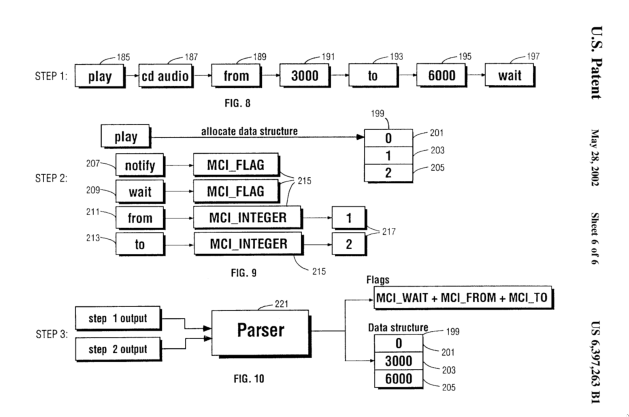
<p>IBM <a href="https://patents.google.com/patent/US6397263">patented</a> this parsing mechanism. The patent goes as far as specifying that tokens are kept in a linked list rather than an array, probably for low-memory devices, and that the parsed arguments end up in a byte array at fixed offsets.</p>

<p><a href="https://github.com/wine-mirror/wine/blob/9e99c6f66d236101a084b6a3a24c98b5c8677fe5/dlls/winmm/mci.c">Wine’s MCI parser</a> does the same thing: it parses the command strings a Win32 program sends and translates them into calls to Linux sound and video APIs. ScummVM does the same with its own APIs, but stores each command’s arguments in a hash table instead of a byte array.</p>

<p><img src="/assets/img/mci/patent.png" alt="MCI patent (parsing part)" /></p>]]></content><author><name></name></author><category term="mci" /><category term="scummvm" /><category term="wine" /><summary type="html"><![CDATA[MCI (Media Control Interface) is an old Windows API for controlling media devices with high-level command strings like play file.wav from 0 to 100. The general shape is:]]></summary></entry></feed>